Showing posts with label Cleaner. Show all posts

Monday, August 15, 2016

How to clean SD card space upto 1GB using Es File Explorer?

Hello Gyes welcome to ssr tut blog!Today I write about, How to clean SD card space upto 1GB using Es File Explorer!
  1. What space is available on your phone ?
  2. Memory is full of junk ?
  3. Can not fetch files from a friend ?
  4. Or memory cards for phones Speed ​​has reduced prices ?
If you read this article carefully.
If you use Android Then please install Es file Explorer from google play store.Es File Explorer Is a more Helpful apps For Android System.

How Do I Do it?

At first Run Es File Explorer.

Then click Search Box, type "cache" and click enter.


wait some seconds.
if you view many files or folders then long press into following files.


Click Right corner,and press "Select All".
if you click Select all then click Delete option!


Press "ok" and wait...[Note if you want hide this option then please click on hide]

If you see root option click on following option!


If you successfully Delete caches then Go back home and retype"thumb" & Now, as before, to work in accordance with guidelines.
Previous work in accordance with the instructions.


You can also try in the Es File Explorer search box:

  • .rar (Your Android phone is connected to the PC , and if you ever try to find)  Note:If you have any personal Rar files do not tick it
  • .exe (Your Android phone is connected to the PC , and if you ever try to find) Note:If you have any personal exe files do not tick it(Ex:Any Pc Software) 
  • .pif (Your Android phone is connected to the PC , and if you ever try to find)
  • .scr (Your Android phone is connected to the PC , and if you ever try to find)
[If you Faces Any Problems Then Please Comment here I'll try to help yourself.]
or watch this Video


That's all,and thank you so much being SSR Tut.Have a nice Day.
Thursday, August 11, 2016

CLEANit apps Full Review & Hidden Tools

Hey Gyes.How are you today?
This is my 2nd post in SSR Tut Blog[Click Here to read my first post:Az Screen Recorder].Today I write , how to use Cleanit apps and cleanit of the hidden tools.If you want to use it successfully, read it carefully.

Lets Go...

About CLEANit - Boost,Optimize,Small apk:

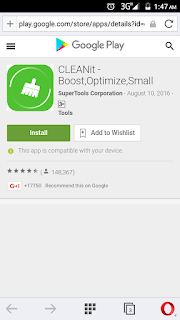
[At first Click here to Install CLEANit]
Cleanit is An free extraordinary junk file cleaner dedicated to make your Android cleaner,faster and safer than ever before.With the smallest package and the most powerful function, it offers a safe, fast, and efficient service to users worldwide.It’s advanced real -time supervision on the usage of your phone makes the CPU work more efficiently and boost your phone by cleaning junk files, reclaiming storage and freeing up RAM.No more overheating and extends the standby time to the greatest degree.
Cleanit is a High Rating app on Google Play store!Now
Cleanit play store Rating is 4.5!Current Version1.2.98_ww.Installs 5,000,000 - 10,000,000!See their Popularity in this following screenshoot!

Popularity of CLEANit

Popularity of CLEANit

Cleanit solved This following problems:

  1. Have many junks and caches eat up spaces,Cleanit clean all junks,caches and make free space!
  2. Battery drains fast due to auto-start apps?Cleanit Save more battery Power upto 70%
  3. Protecting Important files!
  4. Fast and efficient cleaning process.
  5. Monitors the usage of your phone at real time and optimizes the RAM.
  6. Kills the unnecessary running program to help the CPU work more efficiently.
  7. Scans the usage of your battery and extends the standby time.
  8. Junk files will be cleaned comprehensively.
and many more!

Tools&Futures:

  • Clean junk&Caches
  • Boost Phone&Ram
  • Free space
  • Battery Saver
  • Kills the unnecessary running program
  • App locker
  • Charging Boost
  • App uninstaller
  • File locker
Problems of CLEANit:
CLEANit is an totally free app for Android users Therefore this app show many many ads on your Screen!Sometimes When you unwary CLEANit Clen all apk files from SD Card when you didn't thick apk option from Caches!Sometimes Its might crash when you used 250,512 MBps Ram!I suggest 1 GB Ram For cleanit app!

How to use CLEANit?

Hidden Tools & Setting

Work Step by step:
At first install cleanit and running cleanit app.When running the app , you will see it:

Click on CLEANit button and wait..
After some moments you see that.
Note:If you didn't remove any apk files then unthick apk files like this ScreenShoote!


Then Click Cleanit like this ScreenShoot.


At the end of the work

Phone Boost option 
If you want Boosting your Phone, and free spaces Then you can use This Tools!
At first Runnig This app and click on Phone Boost.
Click on phone Boost
Wait, Phone Boost is Running)) 

Battery Saver
Battery Saver is a Greatest Tools of CLEANit,
You can use it to save the battery charge to 70 %.The option to charge more than the cost of your phone apps that stopped.

How Dose it Work?
At first click on Battery Saver.

Wait!
Then Thick Any app if you want to close&Click on Save!
Yes All is ok!You Successfully Do This!

Uninstall Manager:
Use it if you want to UNINSTALL multiple applications at once

For today . We'll talk another episode .Thank you for Stay with us.Have a Good Day

Hey, we've just launched a new custom color Blogger template. You'll like it - https://t.co/quGl87I2PZ
Join Our Newsletter